st is the AppleCommander shape table tool utility. It is embedded in the AppleCommander applicaiton for viewing shape tables. st is a command-line tool to investigate and (ultimately) author shape tables for inclusion in Applesoft programs. The downloads can be found at the bastools project.
Usage
$ st --help
Usage: st [-hV] [--debug] [COMMAND]

Shape Tools utility

Options:
      --debug     Dump full stack traces if an error occurs
  -h, --help      Show this help message and exit.
  -V, --version   Print version information and exit.

Commands:
  extract   Extract shapes from shape table
  generate  Generate a shape table from source code
  help      Display help information about the specified command.
Sub-command extract
$ st extract --help
Usage: st extract [-hO] [--skip-empty] [--stdin] [--stdout]
                  [--border=<borderStyle>] [--coding=<codeStyle>]
                  [--format=<outputFormat>] [-o=<outputFile>] [-w=<width>]
                  [--shapes=<shapeNums>]... [<inputFile>]

Extract shapes from shape table

Parameters:
      [<inputFile>]          File to process

Options:
      --border=<borderStyle> Set border style (none, simple, box)
                               Default: simple
      --coding=<codeStyle>   Select source style (bitmap, long, short)
                               Default: long
      --format=<outputFormat>
                             Select output format (text, source, png, gif, jpeg,
                               bmp, wbmp)
                               Default: text
      --shapes=<shapeNums>   Extract specific shape(s); formats are '1' or '1-4' and
                               can be combined with a comma
      --skip-empty           Skip empty shapes
      --stdin                Read from stdin
      --stdout               Write to stdout
  -h, --help                 Show help for subcommand
  -o, --output=<outputFile>  Write output to file
  -O, --optimize             Optimize vector shapes (source only)
  -w, --width=<width>        Set width (defaults: text=80, image=1024)
Sub-command generate
$ st generate --help
Usage: st generate [-h] [--demo-code] [--single] [--stdin] [--stdout]
                   [--address=<address>] [--name=<realName>] [-o=<outputFile>]
                   [<inputFile>]

Generate a shape table from source code

Parameters:
      [<inputFile>]         File to process

Options:
      --address=<address>   Address for AppleSingle file
                              Default: 24576
      --demo-code           Generate a ProDOS .po image with Applesoft BASIC code
                              demoing the shape table
      --name=<realName>     Filename assign in AppleSingle file
                              Default: SHAPES.BIN
      --single              Write to AppleSingle file (requires address, defaults to
                              0x6000)
      --stdin               Read from stdin
      --stdout              Write to stdout
  -h, --help                Show help for subcommand
  -o, --output=<outputFile> Write output to file
Features
Text extract
$ st --debug extract --stdout --border=box --skip-empty --format=text --width=132 ~/Downloads/shapes/NEW\ MOUSE
┌─────────────────┬─────────────────┬─────────────────┬─────────────────┬─────────────────┬─────────────────┬─────────────────┐
│XXXXXXXXXXXXXXXX*│...........*X..  │......XXXXX...+  │XXXXXXXXXXXXXXX* │XXXXXXXXXXXXXXX* │.X.X.X.X.X.X.X.* │.X.X.X.X.X.X.X.* │
│X...............X│.....XXXX.XX...  │..XXXXX...XX...  │XXXXXXXXXXXXXXXX │XXXXXXXXXXXXXXXX │.X.X.X.X.X.X.X.X │.X.X.X.X.X.X.X.X │
│X...............X│....XXXXXXXX...  │......XXXXX....  │XXXXXXXXXXXXXXXX │XXXXXXXXXXXXXXXX │.X.X.XXXXXXX.X.X │.X.X.X.....X.X.X │
│X...............X│..XXXXXXXXXXX..  │...............  │XXXXXXXXXXXXXXXX │XXXXXXXXXXXXXXXX │.X..XX.....XX..X │.X.X.X.XXX.X.X.X │
│X...............X│.XX.XXXXXXX.XX.  │....XX..XXX....  │XXXXXXXXXXXXXXXX │XXXXXXXXXXXXXXXX │.X..X.XX.XX.X..X │.X.X..XX.XX..X.X │
│X...............X│.X...XXXXXXXXXX  │.....XX.XXX....  │XXXXXXXXXXXXXXXX │XXXXXXXXXXXXXXXX │.X..XX.....XX..X │.X.X.XX.XX.X.X.X │
│X...............X│.XX............  │.....XX.XXXX...  │XXXXXXXXXXXXXXXX │XXXXXX....XXXXXX │.X.X.XX.X.XX.X.X │.X.X.XXXX..X.X.X │
│X...............X│..XXX.XX.......  │....XX.XXXXX...  │XXXXXXXXXXXXXXXX │XXXXX......XXXXX │.X.X..XX.XX..X.X │.X..XX.X..XX.X.X │
│X...............X│....XXX........  │......XXXXXX...  │XXXXXXXXXXXXXXXX │XXXX........XXXX │.X..XX.XXX.XX..X │.X.XX..XX.XX.X.X │
│X...............X│...............  │...XXXXXXXXXXX.  │XXXXXXXXXXXXXXXX │XXXX........XXXX │.X.XXX..X..XXX.X │.X....XXXXXX.X.X │
│X...............X│...............  │..XX.........XX  │XXXXXXXXXXXXXXXX │XXX..........XXX │.X.X.XXX.XXX.X.X │.X.XXXXXXXXXXX.X │
│X...............X│                 │..XX.........XX  │XXXXXXXXXXXXXXXX │XXX..........XXX │.X.X...XXX...X.X │..XX.........XX. │
│X...............X│                 │...XXXXXXXXXXX.  │XXXXXXXXXXXXXXXX │XXX..........XXX │.X.X.XXX.XXX.X.X │..XX.........XX. │
│X...............X│                 │...............  │XXXXXXXXXXXXXXXX │XXX..........XXX │.X.XXX.X.X.XXX.X │.X.XXXXXXXXXXX.X │
│X...............X│                 │                 │XXXXXXXXXXXXXXXX │XXXXXXXXXXXXXXXX │.X..XX.X.X.XX..X │.X.X.X.X.X.X.X.X │
│X...............X│                 │                 │                 │                 │                 │                 │
│XXXXXXXXXXXXXXXXX│                 │                 │                 │                 │                 │                 │
├─────────────────┼─────────────────┼─────────────────┼─────────────────┼─────────────────┼─────────────────┼─────────────────┤
│.......XX.....+  │..X.X.X.X.X.X.X  │.X.X.X.X.X.X.X.* │.....XX*XXXX...  │                 │                 │                 │
│.....XX..X.....  │..X.X.X.X.X.X.X  │.X.X.X.X.X.X.X.X │.......XXX.....  │                 │                 │                 │
│...XX...XX.....  │..X.X.X.X.X.X.X  │.X.X.X.X.X.X.X.X │...XXXXXXXXXXX.  │                 │                 │                 │
│.......XXXX....  │..X.X.X.X.X.X.X  │.X.X.X.X.X.X.X.X │..XXXXXXXXXXXXX  │                 │                 │                 │
│.....XXXXXXXX..  │..X.X.X.X.X.X.X  │.X.X.X.X.X.X.X.X │..XXXXXXXXXXXXX  │                 │                 │                 │
│....XXX...XXXX.  │..X.X.X.X.X.X.X  │.X.X.X.X.X.X.X.X │..XXXXXXXXXXXXX  │                 │                 │                 │
│...XXXX.XX.XXXX  │..X.X.X.X.X.X.X  │.X.X.X.X.X.X.X.X │...............  │                 │                 │                 │
│...XXXX.XX.XXXX  │..X.X.X.X.X.X.X  │.X.X.X.X.X.X.X.X │                 │                 │                 │                 │
│...XXXX.XX.XXXX  │..X.X.X.X.X.X.X  │.X.X.X.X.X.X.X.X │                 │                 │                 │                 │
│...XXXX.XX.XXXX  │..X.X.X.X.X.X.X  │.X.X.X.X.X.X.X.X │                 │                 │                 │                 │
│....XXX...XXXX.  │..X.X.X.X.X.X.X  │.X.X.X.X.X.X.X.X │                 │                 │                 │                 │
│.....XXXXXXXX..  │..X.X.X.X.X.X.X  │.X.X.X.X.X.X.X.X │                 │                 │                 │                 │
│.......XXXX....  │..X.X.X.X.X.X.X  │.X.X.X.X.X.X.X.X │                 │                 │                 │                 │
│...............  │..X.X.X.X.X.X.X  │.X.X.X.X.X.X.X.X │                 │                 │                 │                 │
│                 │..X.X.X.X.X.X.X  │.X.X.X.X.X.X.X.X │                 │                 │                 │                 │
│                 │                 │                 │                 │                 │                 │                 │
│                 │                 │                 │                 │                 │                 │                 │
└─────────────────┴─────────────────┴─────────────────┴─────────────────┴─────────────────┴─────────────────┴─────────────────┘
Graphics extract
$ st --debug extract --shape 3 --output robot.png --format png --border box ~/Downloads/shapes/NEW\ MOUSE

$ st --debug extract --output=new-mouse-shapes.png --border=box --skip-empty --format=png ~/Downloads/shapes/NEW\ MOUSE

Shape generation
These samples show a variety of input methods and pipes the resulting (binary) shape table back to st to display the results. (Otherwise it's a bit hard to demonstrate!)
Apple 'box'
$ cat api/src/test/resources/box-longform.st
; A vector box as given by Applesoft BASIC Programmer's Reference Manual

; Notes:
;   move[up|down|left|right] = move vector
;   plot[up|down|left|right] = plot vector
;   whitespace is ignored
;   case insensitive

.long label-long
    movedown 2
    plotleft 2
    moveup
    plotup 3
    moveright
    plotright 3
    movedown
    plotdown 3
    moveleft
    plotleft

$ st generate --stdout api/src/test/resources/box-longform.st | st extract --stdin --stdout
+-----+
|.XXX.|
|X...X|
|X.+.X|
|X...X|
|.XXX.|
+-----+
The Mouse Maze mouse
$ cat mouse.st
; extracted from NEW MOUSE

.bitmap
    ..........*X..
    ....XXXX.XX...
    ...XXXXXXXX...
    .XXXXXXXXXXX..
    XX.XXXXXXX.XX.
    X...XXXXXXXXXX
    XX............
    .XXX.XX.......
    ...XXX........

$ st generate --stdout mouse.st | st extract --format=source --coding=short --stdin --stdout
.short
  DDDRDDRRUlLdlLLLLLLURRRRRULLLLLLDUlLDLDDRDRRDRRURUuluuruRRRULlLLDLLUrRrrrurrrU
Generate to AppleSingle
$ cat api/src/test/resources/box-longform.st | st generate --stdin --stdout --single | asu info --stdin
Real Name: SHAPES.BIN
ProDOS info:
  Access: 0xC3
  File Type: 0x06
  Auxtype: 0x6000
File dates info:
  Creation: 2018-06-20T01:36:59Z
  Modification: 2018-06-20T01:36:59Z
  Access: 2018-06-20T01:36:59Z
  Backup: 2018-06-20T01:36:59Z
Data Fork: Present, 14 bytes
Resource Fork: Not present
Generate demo disk
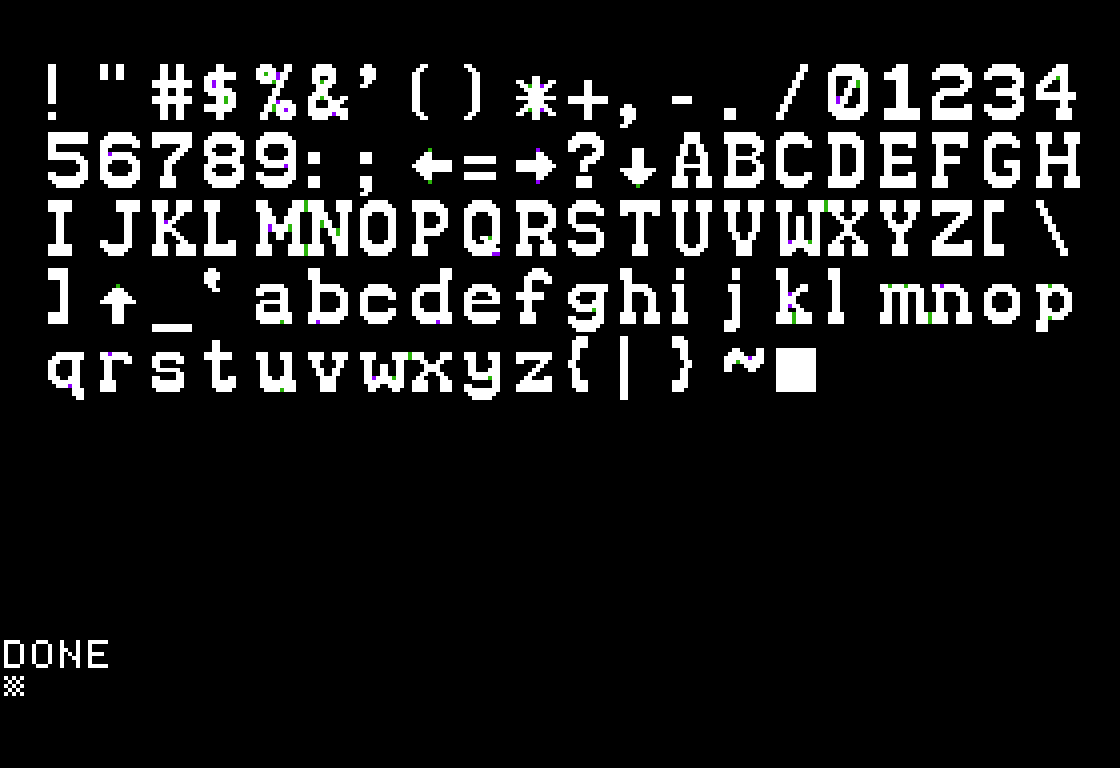
Demonstration of a Beagle Bros font:
st --debug extract --format=source --coding=short ~/Downloads/shapes/\]WESTERN.dump --stdout --skip-empty --optimize |
    st generate --demo-code -o western.po --stdin
Shape source
Note
Note that all the shape directives may also include a variable name to reference in generated code when built with the bt tool.
Most of these samples define the same shape as given by Applesoft BASIC Programmer's Reference Manual - a box.
Bitmap format
Note
When a bitmap shape is specified, there is some attempt to optimize the drawing. No promises, but "sweeping" from various directions and a "distance" calculation are done. Currently, there are 9 patterns and the shortest one is taken.
To introduce a bitmap shape, use the .bitmap directive.
The bitmap defines an XY grid of plot/no-plot zones. An origin may be specified and if not specified defaults to (0,0).
Notes:
x= plot.= no plot; used to clarify image regions+= origin, no plot (assumed to be upper-left if unspecified)*= origin, plot- whitespace is ignored
Sample:
.bitmap
    .xxx.
    x...x
    x.+.x
    x...x
    .xxx.
Long vector format
Note
The vector formats also optimize a bit. If there are "useless" moves (such as a left-right move with no plotting) are dropped.
To introduce a long vector shape, use the .long directive.
Notes:
move[up|down|left|right] = move vectorplot[up|down|left|right] = plot vector- whitespace is ignored
- case insensitive
- accepts a numerical argument for repetition
.long
    movedown 2
    plotleft 2
    moveup
    plotup 3
    moveright
    plotright 3
    movedown
    plotdown 3
    moveleft
    plotleft
Short vector format
Note
The vector formats also optimize a bit. If there are "useless" moves (such as a left-right move with no plotting) are dropped.
To introduce a short vector shape, use the .short directive.
Notes:
u,d,l,r= move vectorU,D,L,R= plot vector- whitespace is ignored
- case sensitive
.short
    dd
    LL
    uUUU
    rRRR
    dDDD
    lL
External shape import
Important
At this time, it is important that the import line is last since the code (stupidly) does the import at that point.
If it is not last, you will get an error.
To import shapes from either an existing shape table (type bin) or from other shape source (type src), use the .external directive.
For example, this imports all text from the Beagle Brothers ]IMPERATOR font from Apple Mechanic.
.external
  type=bin
  shapes=1-96
  import=imperator.bin
To import shapes from another set of shape "source code", this would import mice:
.external
  type=src
  shapes=1,3
  import=mouse.st
The shapes range can be specified as follows:
- Range:
m-nwherem<n. - Distinct values:
a,b,c,d. - Single value:
x. - Combination:
m-n;a,b,c,d;x. Note that the semicolon (;) separates the range specifications.
This should allow shapes to be "picked" from existing shape tables.